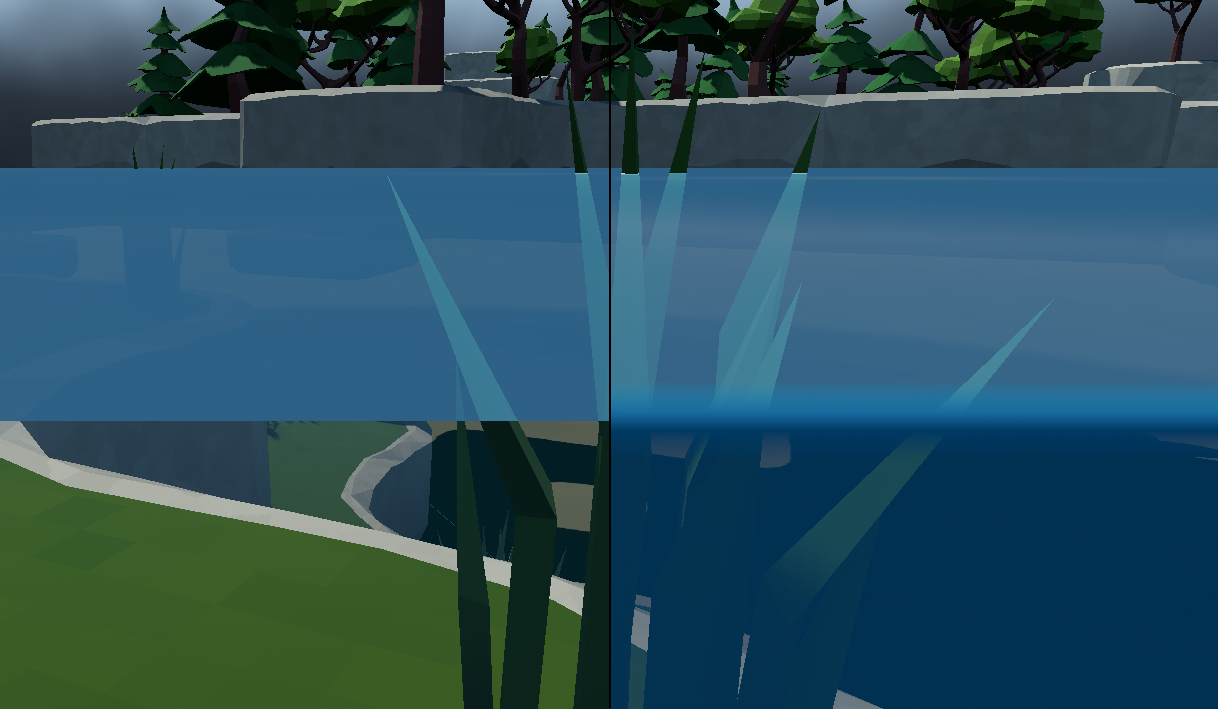
Standard water surface camera clipping vs with waterline post-process shader.
A Godot shader to add a waterline transition effect when the camera goes below a water surface, etc. Shader is applied to a full screen quad as described in the Godot documentation for advanced post-processing. Waterline gradient texture should be set up going from transparent to solid to semi-transparent (or similar) on the Y axis, add color as required.
! This shader only allows for a global flat water plane. If a height-map displaced water plane is required see the next section.
Shader Code - Single Flat Water PlaneDownload
shader_type spatial;
render_mode unshaded, fog_disabled, blend_mix, depth_draw_opaque, cull_back;

uniform float waterline = 0.0;
uniform float waterline_width : hint_range(0.001, 0.02, 0.0001) = 0.004;
uniform sampler2D texture_waterline : source_color, filter_linear_mipmap, repeat_disable;

uniform vec4 albedo : source_color = vec4(1.0, 1.0, 1.0, 1.0);
uniform sampler2D texture_albedo : source_color, filter_linear_mipmap, repeat_enable;

uniform vec3 uv1_scale = vec3(1.0, 1.0, 1.0);
uniform vec3 uv1_offset;


// ** Varyings **//
varying float _width;


void vertex() {
    POSITION = vec4(VERTEX.xy, 1.0, 1.0);

    _width = -waterline_width;
}

void fragment() {
    vec2 base_uv = UV;

    float depth = FRAGCOORD.z;
    // FRAGCOORD go from [0, VIEWPORT_SIZE] so dividing it by VIEWPORT_SIZE
    // makes it to go from [0, 1]. Multiply it by 2 makes it to [0, 2] and
    // subtracting 1 makes it go from [-1,1] which is the correct range
    // for normalized device coordinates (ndc).
    vec2 frag_ndc = ((FRAGCOORD.xy / VIEWPORT_SIZE) * 2.0) - 1.0;
    // Use the INV_PROJECTION_MATRIX to go from NDC to viewspace.
    vec4 frag_view_space_position = INV_PROJECTION_MATRIX * vec4(frag_ndc, depth, 1.0);
    frag_view_space_position /= frag_view_space_position.w;
    // Use the INV_VIEW_MATRIX to go from view space to world space
    vec4 frag_world_space = INV_VIEW_MATRIX * frag_view_space_position;

    vec4 albedo_tex = texture(texture_albedo, base_uv);
    ALBEDO = albedo.rgb * albedo_tex.rgb;

    // To tile waterline texture on x axis multiply FRAGCOORD.x/VIEWPORT_SIZE.x by tile amount.
    vec2 waterline_uv = vec2(fract(FRAGCOORD.x/VIEWPORT_SIZE.x), (((frag_world_space.y - waterline) + _width) / (_width*2.0)));
    vec4 waterline_tex = texture(texture_waterline, clamp(waterline_uv, 0.0, 1.0));
    ALBEDO = ALBEDO * waterline_tex.rgb;

    ALPHA *= waterline_tex.a;
}
License: Zero-Clause BSD
Waterline Shader With Height-map Displaced Mesh Plane
If the water surface needs to be displaced by a varying amount using a height-map this shader can be used. Note that this is much more computationally expensive. Mainly because we can't just sample the height-map texture as the interpolation does not work correctly. (Texture interpolation does not account for the creases created when a quad is triangulated.) Instead we have to recreate the surface triangle and sample a point on it to get the correct water height.
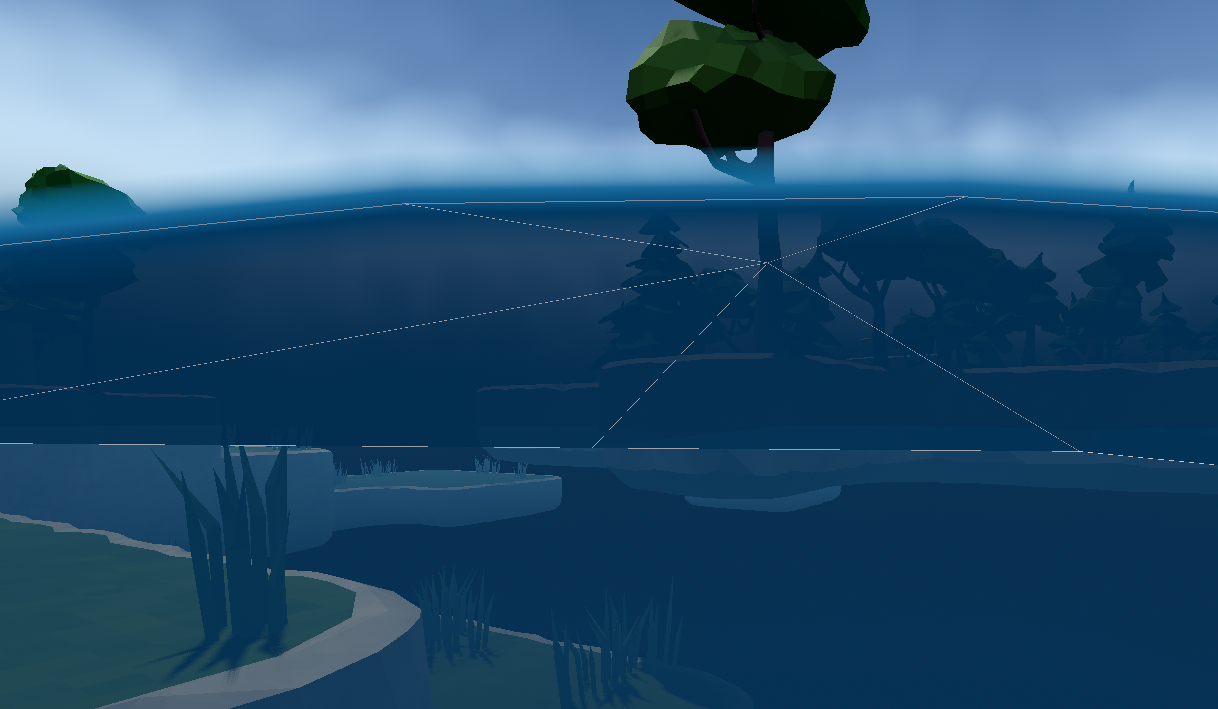
Height-map displaced waterline post-process shader.
Shader code assumes a PlaneMesh with a size equaling the displacement texture size and subdivided by the texture size minus two. Subtracting two from the subdivision amount results in each pixel in the displacement texture having a matching vertex. Code also assume plane is centered on the world origin. Water plane shader and the post process shader need to be provided with the same displacement texture in the waterline_height parameter. Shaders use sin & cos to animate moving waves, this function needs to match in both shaders.
Shader CodeDownload
// Gets the four corners vertexes and pixels from the current quad the screen space fragment lands on
//  Use corners to calculate water surface height. (barycentric coordinates of both triangles)
// Using texture interpolation does not account for creases in the plane caused by the triangulation
//  Corner vertices end up at correct height but everything else might be wrong.
// Render priority may need to be adjusted if water plane clips through surface
// Water plane mesh needs to be subdivided by (size of texture - 2) so every vertex gets assigned a color, and have the same size as the texture in world units.

// NOTE: Shader automatically converted from Godot Engine 4.7.1.stable's StandardMaterial3D.

shader_type spatial;
render_mode unshaded, fog_disabled, blend_mix, depth_draw_opaque, cull_back;

uniform float waterline = 0.0;
uniform float waterline_width : hint_range(0.001, 0.02, 0.0001) = 0.004;
uniform sampler2D texture_waterline : source_color, filter_linear_mipmap, repeat_disable;
uniform sampler2D waterline_height : hint_default_black, filter_linear, repeat_disable;

uniform vec4 albedo : source_color = vec4(1.0, 1.0, 1.0, 1.0);
uniform sampler2D texture_albedo : source_color, filter_linear_mipmap, repeat_enable;

uniform vec3 uv1_scale = vec3(1.0, 1.0, 1.0);
uniform vec3 uv1_offset;


// ** Varyings **//
varying float _width;


float steppedf_floor(float p_value, float p_step) {
    return floor(p_value / p_step) * p_step;
}
vec2 steppedvec2_floor(vec2 p_value, vec2 p_step) {
    return vec2(steppedf_floor(p_value.x,p_step.x), steppedf_floor(p_value.y,p_step.y));
}

// https://stackoverflow.com/a/5507832  // CC BY-SA
vec2 calcY(vec3 p1, vec3 p2, vec3 p3, vec2 v) {
    float det = (p2.z - p3.z) * (p1.x - p3.x) + (p3.x - p2.x) * (p1.z - p3.z);

    float l1 = ((p2.z - p3.z) * (v.x - p3.x) + (p3.x - p2.x) * (v.y - p3.z)) / det;
    float l2 = ((p3.z - p1.z) * (v.x - p3.x) + (p1.x - p3.x) * (v.y - p3.z)) / det;
    float l3 = 1.0f - l1 - l2;

    vec2 result = vec2(0.0, l1 * p1.y + l2 * p2.y + l3 * p3.y);
    if (l1 < 0.0 || l2 < 0.0 || l3 < 0.0) {
        // Point out of bounds, return error value.
        result.s = -1.0;
    }

    return result;
}

void vertex() {
    POSITION = vec4(VERTEX.xy, 1.0, 1.0);

    _width = -waterline_width;
}

void fragment() {
    vec2 base_uv = UV;

    float depth = FRAGCOORD.z;
    // FRAGCOORD go from [0, VIEWPORT_SIZE] so dividing it by VIEWPORT_SIZE
    // makes it to go from [0, 1]. Multiply it by 2 makes it to [0, 2] and
    // subtracting 1 makes it go from [-1,1] which is the correct range
    // for normalized device coordinates (ndc).
    vec2 frag_ndc = ((FRAGCOORD.xy / VIEWPORT_SIZE) * 2.0) - 1.0;
    // Use the INV_PROJECTION_MATRIX to go from NDC to viewspace.
    vec4 frag_view_space_position = INV_PROJECTION_MATRIX * vec4(frag_ndc, depth, 1.0);
    frag_view_space_position /= frag_view_space_position.w;
    // Use the INV_VIEW_MATRIX to go from view space to world space
    vec4 frag_world_space = INV_VIEW_MATRIX * frag_view_space_position;

    vec4 albedo_tex = texture(texture_albedo, base_uv);
    ALBEDO = albedo.rgb * albedo_tex.rgb;

    // NOTE: value returns zero when the texture is not set, this makes the animation stop working.
    vec2 waterheight_size = vec2(textureSize(waterline_height,0));

    // *** Naive texture sampling *** //
    // Does not account for creases created by quad triangulation.
    // In most cases where the water surface is only slightly displaced it's not very noticeable.
    //vec2 waterheight_uv = (frag_world_space.xz/waterheight_size)+vec2(0.5,0.5);
    //float waterline_mod = texture(waterline_height, waterheight_uv).r * 0.2;

    // Animate
    //waterline_mod = waterline_mod + (cos((frag_world_space.x+(TIME/2.0))* 0.2) * sin((frag_world_space.z+(TIME/2.0)) * 0.2) * 0.25);


    // *** Barycentric sampling *** //
    // Since we don't have access to the mesh plane triangles here we have to recompute them.
    // Get the four corners of the plane (2 triangles) that the fragment is in/on.
    // Water plane mesh needs to be subdivided by (size of texture - 2) so every vertex gets assigned a pixel, and have the same size as the texture in world units.
    vec2 vertex_spacing = waterheight_size/(waterheight_size-1.0); // vec2(512.0)/vec2(511.0);
    // Floor origin corner instead of rounding to nearest corner.
    vec2 vertex_ws_0 = steppedvec2_floor(frag_world_space.xz-(vertex_spacing/2.0), vertex_spacing) + (vertex_spacing/2.0);
    vec2 vertex_ws_1 = vertex_ws_0 + (vertex_spacing*vec2(1.0,0.0));
    vec2 vertex_ws_2 = vertex_ws_0 + (vertex_spacing*vec2(1.0,1.0));
    vec2 vertex_ws_3 = vertex_ws_0 + (vertex_spacing*vec2(0.0,1.0));

    //vec2 waterheight_uv_vert = (vertex_ws_0/(waterheight_size+vec2(1.0)))+vec2(0.5,0.5);
    vec4 waterline_mod_vert0 = texture(waterline_height, (vertex_ws_0/(waterheight_size+vec2(1.0)))+vec2(0.5,0.5));
    vec4 waterline_mod_vert1 = texture(waterline_height, (vertex_ws_1/(waterheight_size+vec2(1.0)))+vec2(0.5,0.5));
    vec4 waterline_mod_vert2 = texture(waterline_height, (vertex_ws_2/(waterheight_size+vec2(1.0)))+vec2(0.5,0.5));
    vec4 waterline_mod_vert3 = texture(waterline_height, (vertex_ws_3/(waterheight_size+vec2(1.0)))+vec2(0.5,0.5));

    // Animate before barycentric interpolation.
    waterline_mod_vert0 = waterline_mod_vert0 + (cos((vertex_ws_0.x+(TIME/2.0))* 0.2) * sin((vertex_ws_0.y+(TIME/2.0)) * 0.2) * 0.25) / 0.2;
    waterline_mod_vert1 = waterline_mod_vert1 + (cos((vertex_ws_1.x+(TIME/2.0))* 0.2) * sin((vertex_ws_1.y+(TIME/2.0)) * 0.2) * 0.25) / 0.2;
    waterline_mod_vert2 = waterline_mod_vert2 + (cos((vertex_ws_2.x+(TIME/2.0))* 0.2) * sin((vertex_ws_2.y+(TIME/2.0)) * 0.2) * 0.25) / 0.2;
    waterline_mod_vert3 = waterline_mod_vert3 + (cos((vertex_ws_3.x+(TIME/2.0))* 0.2) * sin((vertex_ws_3.y+(TIME/2.0)) * 0.2) * 0.25) / 0.2;

    vec3 tri_0 = vec3(vertex_ws_0.x,waterline_mod_vert0.r,vertex_ws_0.y);
    vec3 tri_1 = vec3(vertex_ws_1.x,waterline_mod_vert1.r,vertex_ws_1.y);
    vec3 tri_2 = vec3(vertex_ws_2.x,waterline_mod_vert2.r,vertex_ws_2.y);
    vec3 tri_3 = vec3(vertex_ws_3.x,waterline_mod_vert3.r,vertex_ws_3.y);

    // Barycentric triangle interpolation is set up to work with default Godot mesh plane triangulation where each quad is triangulated the same way.
    // If required points passed into calcY can be reordered to account for different triangulation scheme.
    vec2 tri_y = calcY(tri_3, tri_0, tri_1, frag_world_space.xz);
    if (tri_y.s < 0.0) {
        // Only calculate second triangle if first returns out of bounds.
        tri_y = calcY(tri_1, tri_2, tri_3, frag_world_space.xz);
    }
    float waterline_mod = tri_y.y * 0.2;


    // Clamp to water size.
    waterline_mod *= step(-waterheight_size.x/2.0,vertex_ws_0.x);
    waterline_mod *= step(-waterheight_size.y/2.0,vertex_ws_0.y);
    waterline_mod *= 1.0-step(waterheight_size.x/2.0,vertex_ws_0.x);
    waterline_mod *= 1.0-step(waterheight_size.y/2.0,vertex_ws_0.y);


    // To tile waterline texture on x axis multiply FRAGCOORD.x/VIEWPORT_SIZE.x by tile amount.
    vec2 waterline_uv = vec2(fract(FRAGCOORD.x/VIEWPORT_SIZE.x), (((frag_world_space.y - (waterline + waterline_mod)) + _width) / (_width*2.0)));
    vec4 waterline_tex = texture(texture_waterline, clamp(waterline_uv, 0.0, 1.0));
    ALBEDO = ALBEDO * waterline_tex.rgb;
    ALPHA *= waterline_tex.a;
}
License: Zero-Clause BSD - Except for parts indicated as otherwise.
Shader Code - PlaneMesh DisplacementDownload
shader_type spatial;
render_mode blend_mix, depth_draw_always, cull_disabled, diffuse_burley, specular_schlick_ggx;

uniform sampler2D waterline_height : hint_default_black, filter_linear, repeat_disable;

uniform vec4 albedo : source_color;
uniform sampler2D texture_albedo : source_color, filter_linear_mipmap, repeat_enable;
uniform ivec2 albedo_texture_size;

uniform float roughness : hint_range(0.0, 1.0) = 1.0;
uniform sampler2D texture_metallic : hint_default_white, filter_linear_mipmap, repeat_enable;
uniform vec4 metallic_texture_channel;
uniform sampler2D texture_roughness : hint_roughness_r, filter_linear_mipmap, repeat_enable;

uniform float specular : hint_range(0.0, 1.0, 0.01) = 0.5;
uniform float metallic : hint_range(0.0, 1.0, 0.01);

uniform vec3 uv1_scale = vec3(1.0, 1.0, 1.0);
uniform vec3 uv1_offset;


// https://www.reddit.com/r/godot/comments/z7r13b/comment/mayfymo/
// TODO: Verify normals are calculated correctly.
vec3 calc_normal(vec2 uv, float height_range) {
    vec2 texelSize = 1.0 / vec2(textureSize(waterline_height, 0));
    float left = texture(waterline_height, uv + vec2(texelSize * vec2(-1.0, 0.0))).r * height_range;
    float right = texture(waterline_height, uv + vec2(texelSize * vec2(1.0, 0.0))).r * height_range;
    float up = texture(waterline_height, uv + vec2(texelSize * vec2(0.0, -1.0))).r * height_range;
    float down = texture(waterline_height, uv + vec2(texelSize * vec2(0.0, 1.0))).r * height_range;

    return normalize(vec3(left - right, 2.0 * texelSize.x, up - down));
}

void vertex() {
    vec2 waterline_size = vec2(textureSize(waterline_height,0));
    float waterline_mod = texture(waterline_height, (VERTEX.xz/(waterline_size+1.0))+vec2(0.5,0.5)).r * 0.2;

    // Animate
    waterline_mod = waterline_mod + (cos((VERTEX.x+(TIME/2.0))* 0.2) * sin((VERTEX.z+(TIME/2.0)) * 0.2) * 0.25);

    VERTEX.y += waterline_mod;

    NORMAL = calc_normal(UV, 0.001);

    UV = UV * uv1_scale.xy + uv1_offset.xy;
}

void fragment() {
    vec2 base_uv = UV;

    vec4 albedo_tex = texture(texture_albedo, base_uv);
    ALBEDO = albedo.rgb * albedo_tex.rgb;

    float metallic_tex = dot(texture(texture_metallic, base_uv), metallic_texture_channel);
    METALLIC = metallic_tex * metallic;
    SPECULAR = specular;

    vec4 roughness_texture_channel = vec4(1.0, 0.0, 0.0, 0.0);
    float roughness_tex = dot(texture(texture_roughness, base_uv), roughness_texture_channel);
    ROUGHNESS = roughness_tex * roughness;
    ALPHA *= albedo.a * albedo_tex.a;
}
License: Zero-Clause BSD